Maximize Your Marketing Strategies with 5 Essential Google Analytics Reports
To develop impactful marketing strategies that resonate with your target audience, leveraging Google Analytics 4 (GA4) is crucial. Although the GA4 interface and its terminology may initially seem intimidating, gaining a solid understanding of its features can unlock invaluable insights into how customers engage with your brand. By mastering the functionalities of GA4, you can uncover critical information regarding your customers’ preferences and behaviors, allowing you to fine-tune your marketing strategies effectively. Let’s explore five vital GA4 reports that can greatly enhance your marketing efforts and lead to improved outcomes.

1. Traffic Acquisition Report: Discover Your Most Successful Traffic Channels
Have you ever wondered where your website traffic originates? The Traffic Acquisition report is an essential resource that answers this question comprehensively. This powerful report dissects various channels that contribute to your website visitors, highlighting key marketing avenues such as organic search, paid advertising, social media platforms, and referrals. Understanding these traffic sources is fundamental for any marketing strategy aimed at boosting visibility and maximizing conversion rates.
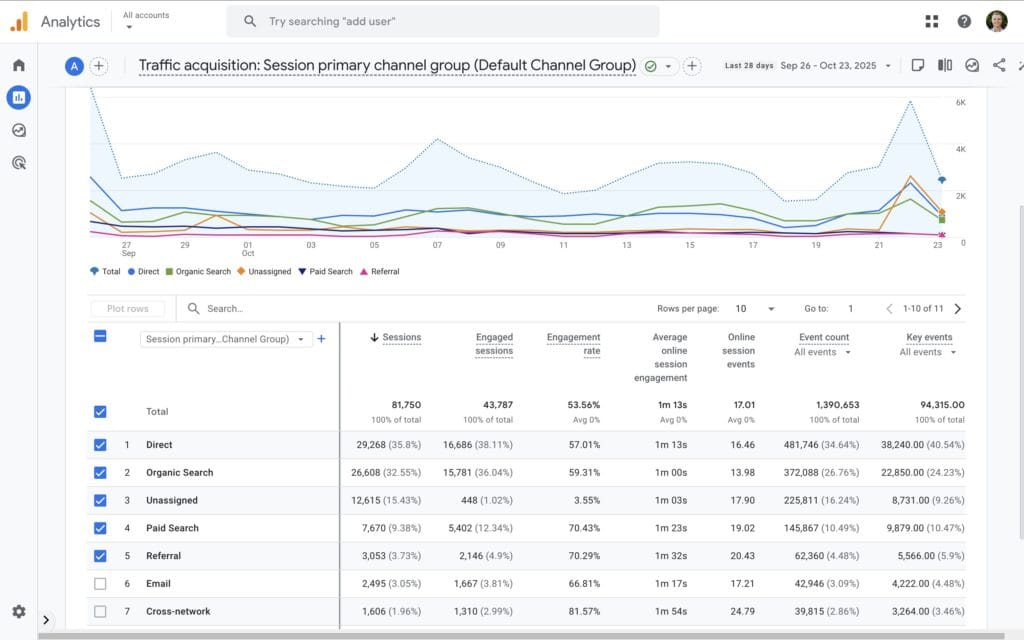
Strategies to Effectively Utilize the Traffic Acquisition Report:
- Identify Your Top-Performing Channels: Analyze which platforms are delivering the highest volume of visitors to your site. If you discover that organic search is leading, consider increasing your investment in SEO initiatives to capitalize on this success.
- Assess Traffic Quality: Go beyond the raw numbers; evaluate metrics such as sessions per user and average engagement time to accurately gauge the true interest and intent of your visitors.
- Optimize Your Marketing Budget: Strategically allocate your marketing budget to the channels that not only drive traffic but also effectively engage visitors, ensuring a higher return on investment.
Understanding the origins of your audience allows you to adjust your marketing focus to prioritize the channels that yield the best results. The report automatically showcases various pathways through which users discover your website, but enhancing its precision through proper tagging of your inbound marketing campaigns is essential. This customization is particularly beneficial when sending newsletters or executing targeted advertising campaigns to drive traffic to your site.
Boost Your Google Analytics Tracking with Campaign-Tagged URLs
Campaign-tagged URLs are custom links to your website that contain additional tracking information known as query parameters. These parameters enable Google Analytics to track your marketing efforts with greater accuracy. By appending these parameters to your URLs, you can gain in-depth insights into how visitors arrive at your site, providing data that goes beyond the default reports.
Advantages of Implementing Campaign-Tagged URLs:
- Track Specific Marketing Campaigns: These URLs help you identify which precise marketing campaigns are effectively driving traffic to your website.
- Understand Visitor Sources: Gain clarity into where your visitors are coming from, whether it’s a newsletter, a social media post, or a paid advertisement.
- Evaluate Campaign Effectiveness: By analyzing data from tagged URLs, you can pinpoint your most successful campaigns and adjust your marketing strategy accordingly.
How Campaign Tagging URLs Improve the Acquisition Reports:
By default, Google Analytics categorizes traffic sources into broad groups such as organic search, direct, referral, and organic social. While this classification provides a foundational overview, it often lacks the granularity needed to derive insights into specific campaigns or links. Campaign-tagged URLs offer a more detailed perspective, facilitating enhanced tracking and analysis.
Steps to Implement Campaign Tagging in Your URLs:
To effectively utilize campaign-tagged URLs, you must append specific parameters to your inbound links. The essential parameters include:
- utm_source – identifies the source of your traffic, such as a newsletter, Facebook, or Google.
- utm_medium – specifies the marketing medium, whether it be email, social media, or cost-per-click (CPC).
- utm_campaign – denotes the specific campaign name, such as ‘spring sale’ or ‘product launch’.
- utm_term (optional) – used primarily for paid search campaigns to identify specific keywords.
- utm_content (optional) – differentiates similar content or links within the same advertisement or campaign.
For an example of a tagged URL:
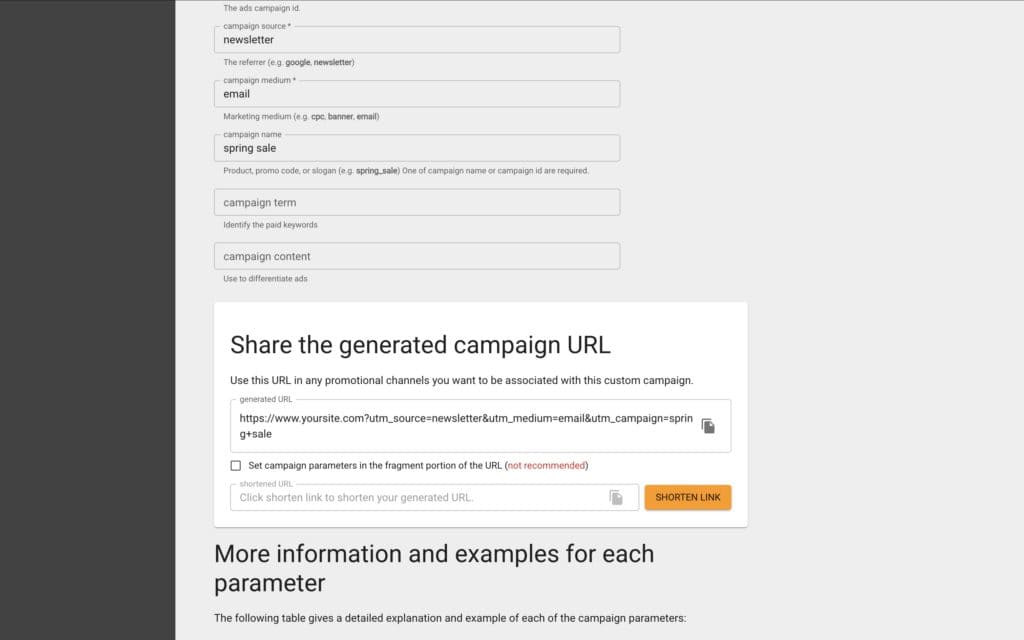
When a user clicks this tagged link, Google Analytics captures the parameters, allowing you to identify that the visitor came from your “spring sale” campaign via an email newsletter. By refining your inbound links with campaign tags, you can accurately track how users discover your website and gauge their engagement levels.
In addition to creating campaign-tagged URLs, linking your Google Ads account with Google Analytics can provide further benefits. You can access a tutorial video that guides you through this process:
2. Engagement Reports: Understand User Interaction and Behavior on Your Website
Attracting visitors to your site is just the beginning. The Engagement Reports deliver critical insights into user behavior after they arrive at your site. Do they engage with your content, or do they leave shortly after? Which pages capture their interest and keep them engaged?
Within the Engagement section, the Pages and Screens report aggregates data on all the pages users have accessed on your website. This report is vital for identifying your most engaging and least engaging content. Key metrics to monitor include:
- Views: The total number of views each page has received, enabling you to quickly pinpoint content that resonates with your audience.
- Views Per Active User: This metric indicates which content users find compelling enough to revisit, reflecting sustained interest or value.
- Key Events: Track significant actions on specific pages, such as purchases, sign-ups, or other conversions. Configuring key events allows you to evaluate how effectively particular pages drive user actions and contribute to your business goals.
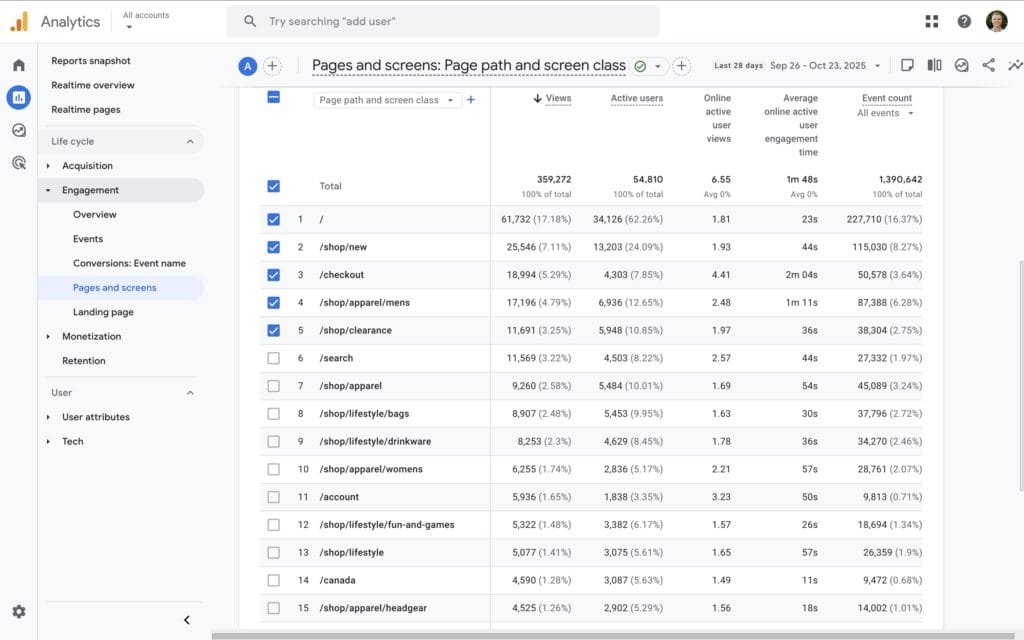
Utilize Engagement Insights to Elevate Your Website Experience:
- Enhance High-Performing Content: If certain blog posts or product pages are yielding exceptional performance, consider creating additional similar content to leverage that interest.
- Improve Low-Engagement Pages: Identify pages with high bounce rates and make necessary revisions to enhance engagement, such as clearer calls to action or more captivating visuals.
- Personalize the User Experience: Ensure that your website’s navigation is intuitive and that the content remains relevant to keep visitors exploring further.
Focusing on user engagement is vital; your goal should not solely be to increase page views, but to cultivate connections that convert visitors into leads and loyal customers for your business.
3. Funnel Exploration Report: Analyze and Optimize the User Journey for Better Conversions
Understanding how users navigate through your website is essential for improving conversion rates. The Funnel Exploration report in GA4 allows you to visualize the steps users take to achieve specific goals, such as completing a purchase or subscribing to a newsletter. This report helps you identify where users drop off in the conversion process, providing insights on how to optimize each stage to enhance the overall user experience.
Steps to Create a Funnel Exploration Report in GA4:
- Navigate to the ‘Explore’ section of GA4.
- Click ‘Blank’ to start a new report.
- Select ‘Funnel Exploration’ from the drop-down menu under ‘Technique’.
Step 2: Define Your Funnel Steps
- Click the pencil icon next to ‘Steps’ to outline your funnel.
- Add a step for each stage in your user journey and assign it a clear name (e.g., ‘Visited Homepage’, ‘Viewed Product’, ‘Added to Cart’, ‘Completed Purchase’).
- For each step, select the event or page view that corresponds to that action.
For example:
- Visited Homepage: Event name equals ‘page_view’ where page path equals ‘/’.
- Viewed Product: Event name equals ‘view_item’.
- Added to Cart: Event name equals ‘add_to_cart’.
- Completed Purchase: Event name equals ‘purchase’.
- After defining all steps, click ‘Apply’ to finalize your funnel setup.
Step 3: Customize Your Funnel (Optional)
- Choose between an ‘Open Funnel,’ which allows users to enter at any step, or a ‘Closed Funnel,’ where users must start from the initial step.
- Set an optional timeframe for how long users have to complete the funnel.
- Add filters to focus on specific user criteria if necessary.
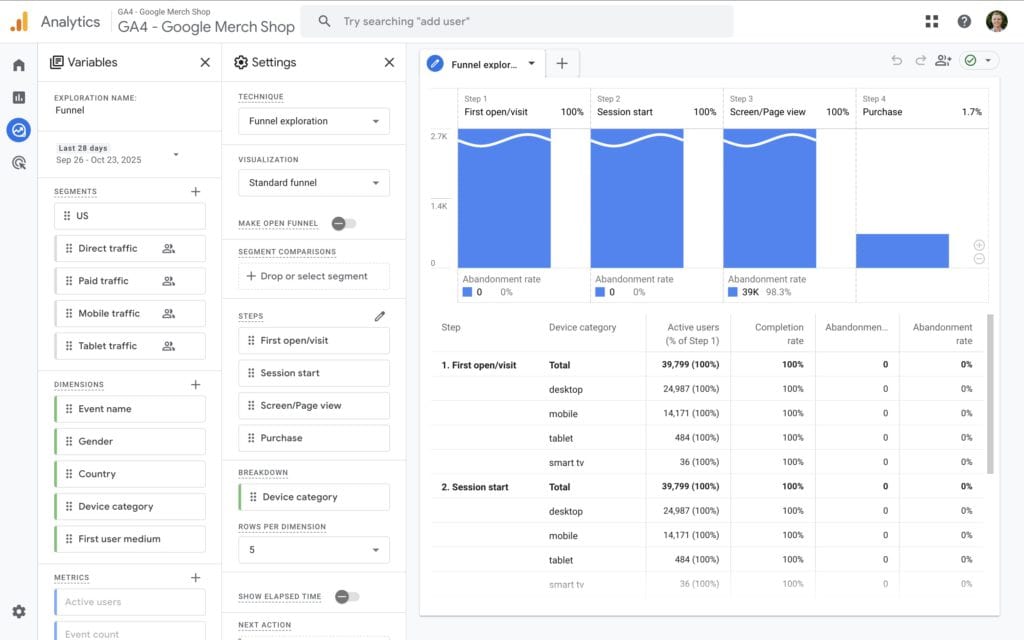
Maximize the Benefits of This Report By:
- Optimizing Conversion Steps: Analyze each stage of the funnel to pinpoint opportunities for enhancement. If a significant number of users exit at a specific step, consider simplifying the process or providing additional guidance.
- Enhancing User Experience: Use insights from the funnel report to create a more intuitive user journey. This might involve redesigning pages, improving load times, or refining calls to action.
- Testing and Iterating: Conduct A/B tests across funnel stages to determine which adjustments lead to higher conversion rates. Continuous testing helps improve the process over time.
- Personalizing Content: Tailor the user experience based on segment behavior. For instance, if mobile users drop off at a certain stage, optimize that step specifically for mobile devices.
Utilizing the Funnel Exploration report empowers you to create a seamless and effective path to conversion. By identifying and addressing weaknesses within your funnels, you can refine the process and effectively guide users towards your desired outcomes.
4. Demographic Insights Report: Gain In-Depth Understanding of Your Audience
The Demographic Insights report provides invaluable information about your audience’s age, gender, location, and interests. This data is essential for helping you tailor your content and marketing campaigns to resonate more effectively with your audience, ultimately driving higher engagement and conversion rates.
Key Takeaways from the Demographic Report:
- Age and Gender Breakdown: Discover the age ranges and gender distribution of your audience, allowing you to tailor your messaging to better suit their preferences.
- Geographic Distribution Insights: Identify the geographic locations of your users to enhance regional marketing efforts and optimize the timing of your campaigns.
- Understanding Interests and Affinities: Gain insights into your users’ interests beyond your website to create more engaging and relevant content.
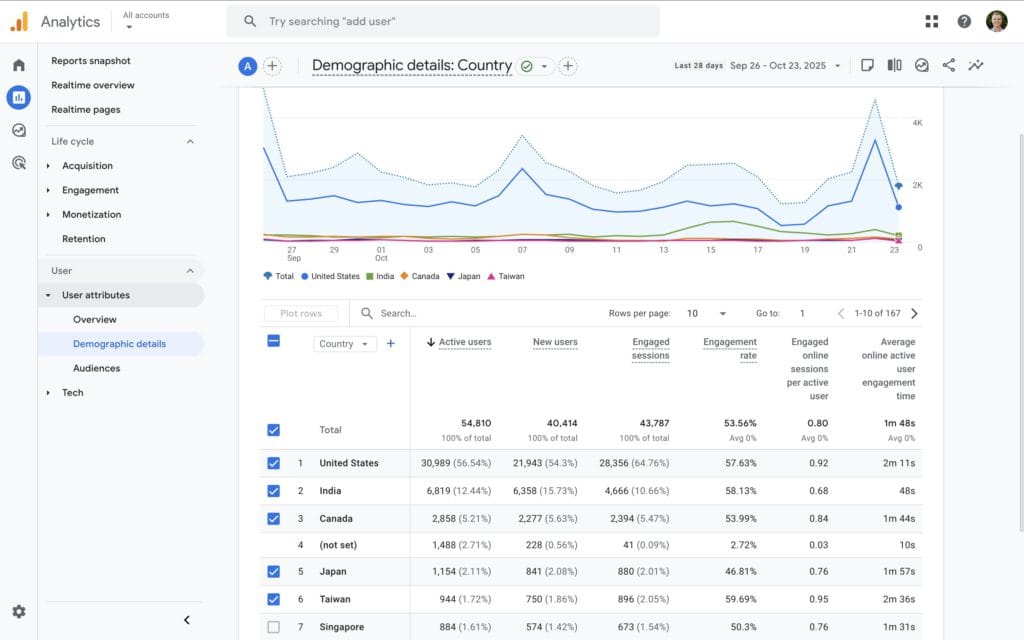
Strategies to Implement Based on Demographic Insights:
- Personalize Your Content: Craft your content and marketing messages to align seamlessly with the preferences of your primary demographic segments.
- Implement Targeted Advertising: Utilize demographic data to refine your ad targeting, ensuring your promotions reach the most receptive audience.
- Expand Your Market Reach: Identify underrepresented demographics that present growth opportunities and develop strategies to engage these potential users.
By concentrating on demographic insights, you can create marketing campaigns that are more effective and relevant, establishing a deeper connection with your audience’s specific needs and preferences.
5. Monetization Insights Report: Uncover Key Details About Your Revenue Streams
For websites that generate revenue, the Monetization reports are indispensable. These reports provide a comprehensive overview of how users contribute to your financial success, enabling you to make informed decisions about your marketing strategies.
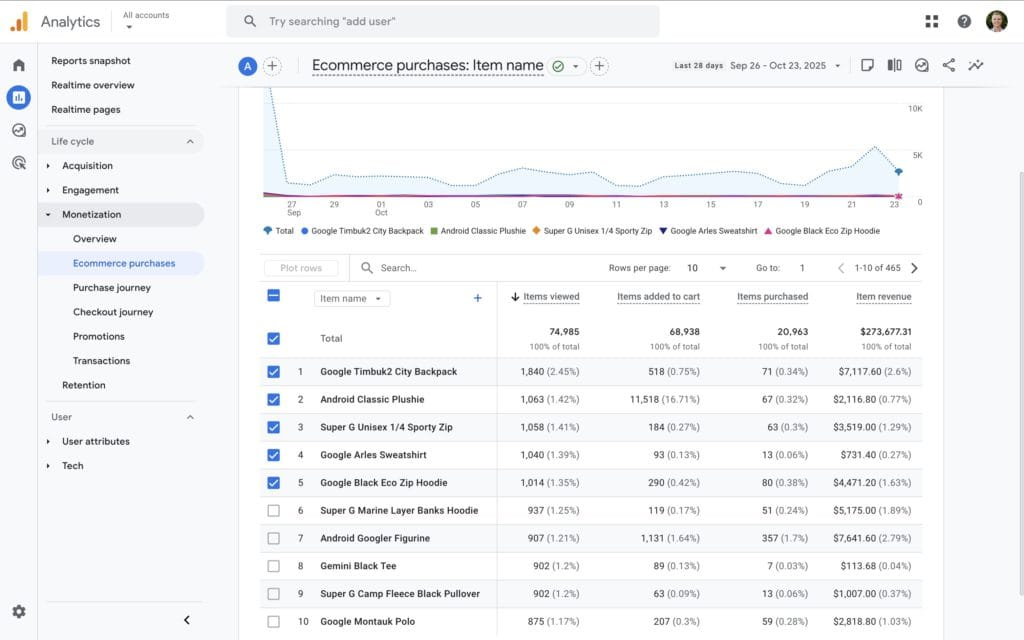
Key Metrics to Monitor for Revenue Insights:
- Total Revenue: The total income generated over a specified period.
- Average Purchase Revenue: The average revenue generated per transaction, which can inform pricing strategies.
- Purchases: Track the frequency and types of products or services sold to understand customer preferences and trends.
Leverage This Data to Boost Your Revenue Streams:
- Identify Your Best-Selling Products: Focus your marketing efforts on products that generate the highest revenue, maximizing profitability.
- Enhance Product Promotion: Increase the visibility and attractiveness of your products to drive sales and boost overall revenue.
- Capitalize on Upselling and Cross-Selling Opportunities: Use purchasing data to recommend complementary products, thereby increasing the average order value for your business.
A thorough understanding of your monetization metrics empowers you to make informed decisions that significantly enhance profitability and drive business growth.
Take Action Now to Master Google Analytics and Elevate Your Marketing Success
By familiarizing yourself with these five essential GA4 reports, you are laying the groundwork for marketing success rooted in data-driven insights. When you feel ready to deepen your expertise in Google Analytics, consider enrolling in a Google Analytics 4 Course to learn how to leverage these reports effectively and maximize the utility of this vital business tool.
It’s important to remember that successful marketing is not solely about attracting visitors; it also involves understanding their needs and behaviors. Utilize the reports discussed above to gain deeper insights into your audience, refine your strategies, and watch your marketing initiatives flourish.
The post 5 Google Analytics Reports Every Marketer Should Know About appeared first on Ezi Gold.
The Article Google Analytics Reports Every Marketer Must Know Was Found On https://limitsofstrategy.com